

目前在产品功能中会涉及到一块内容,使用json表达式去提取json里面的内容。瘴气氨一直使用n8n,可以看到他的功能就可以直接使用{{json.xxx.xxx}}这样的表达式从json里面提取对应的json内容,如下图:
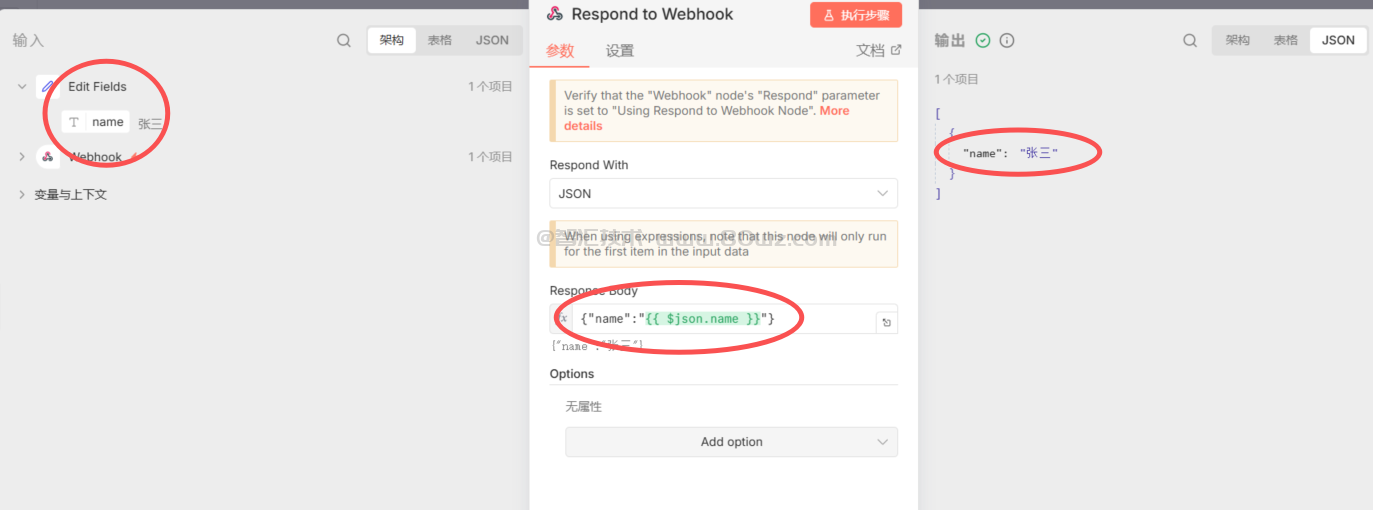
我们目前的场景和他的使用上是一模一样的,所以这里的话,我们在研究的过程中,先编写一个demo来进行实践。
这里我们主要是使用java来进行实践,所以这里我们主要的实现方式是使用java引擎模板来实现,下面我们介绍下具体的实现示例:
1、引入maven依赖
这里我们使用的依赖主要是jackson,所以这里只需要引入jackson的依赖即可:
<dependency>
    <groupId>com.fasterxml.jackson.core</groupId>
    <artifactId>jackson-databind</artifactId>
    <version>2.15.2</version>
</dependency>
2、编写json模板引擎
这里我们可以编写一个关于json解析的模板引擎,这里我已经编写好示例代码了,可以直接抄,每一行代码的话都有相关的注释,大家应该都看得懂。
package org.example;

import com.fasterxml.jackson.databind.JsonNode;
import com.fasterxml.jackson.databind.ObjectMapper;

import java.util.ArrayList;
import java.util.List;
import java.util.Map;
import java.util.regex.Matcher;
import java.util.regex.Pattern;

/**
 * JSON模板引擎实现
 */
public class JsonTemplateEngine {

    // 匹配{{...}}格式的变量表达式
    private static final Pattern VAR_PATTERN = Pattern.compile("\\{\\{([^}]+)\\}\\}");
    // 匹配路径段(如属性名或数组索引)
    private static final Pattern PATH_PATTERN = Pattern.compile("([\\w]+|\\[\\d+\\])");
    // JSON解析器
    private static final ObjectMapper objectMapper = new ObjectMapper();

    /**
     * 处理模板,替换所有{{json.xxx}}变量
     */
    public String process(String template, String json) throws Exception {
        // 将输入的JSON字符串解析为JsonNode对象
        JsonNode rootNode = objectMapper.readTree(json);
        // 调用replaceVariables方法替换模板中的变量
        return replaceVariables(template, rootNode);
    }

    /**
     * 处理模板,支持默认值语法 {{path:default}}
     */
    public String processWithDefault(String template, String json, String globalDefault) throws Exception {
        // 将输入的JSON字符串解析为JsonNode对象
        JsonNode rootNode = objectMapper.readTree(json);
        // 调用replaceVariablesWithDefault方法替换模板中的变量,并使用默认值
        return replaceVariablesWithDefault(template, rootNode, globalDefault);
    }

    /**
     * 处理嵌套模板
     */
    public String processNested(String template, String json, Map<String, String> subTemplates) throws Exception {
        // 将输入的JSON字符串解析为JsonNode对象
        JsonNode rootNode = objectMapper.readTree(json);
        // 初始化结果字符串为输入模板
        String result = template;

        // 遍历所有子模板
        for (Map.Entry<String, String> entry : subTemplates.entrySet()) {
            // 构建占位符字符串,格式为{{key}}
            String placeholder = "{{" + entry.getKey() + "}}";
            // 检查主模板中是否包含该占位符
            if (result.contains(placeholder)) {
                // 使用根节点替换子模板中的变量
                String subResult = replaceVariables(entry.getValue(), rootNode);
                // 将占位符替换为处理后的子模板结果
                result = result.replace(placeholder, subResult);
            }
        }

        // 处理替换子模板后剩余的变量
        return replaceVariables(result, rootNode);
    }

    /**
     * 替换所有变量
     */
    private String replaceVariables(String template, JsonNode rootNode) {
        // 创建StringBuffer用于构建结果字符串
        StringBuffer result = new StringBuffer();
        // 使用预定义的正则表达式匹配模板中的变量
        Matcher matcher = VAR_PATTERN.matcher(template);

        // 遍历所有匹配的变量表达式
        while (matcher.find()) {
            // 获取匹配的表达式内容(去掉{{}})
            String expression = matcher.group(1).trim();
            // 从JSON节点中提取表达式对应的值
            String value = extractValue(rootNode, expression);

            // 如果未找到值则返回空字符串,否则使用提取的值
            String replacement = (value != null) ? value : "";
            // 将替换值添加到结果中
            matcher.appendReplacement(result, Matcher.quoteReplacement(replacement));
        }
        // 将匹配后剩余的文本添加到结果中
        matcher.appendTail(result);

        // 返回处理后的字符串
        return result.toString();
    }

    /**
     * 替换变量,支持默认值
     */
    private String replaceVariablesWithDefault(String template, JsonNode rootNode, String globalDefault) {
        // 创建StringBuffer用于构建结果字符串
        StringBuffer result = new StringBuffer();
        // 使用预定义的正则表达式匹配模板中的变量
        Matcher matcher = VAR_PATTERN.matcher(template);

        // 遍历所有匹配的变量表达式
        while (matcher.find()) {
            // 获取匹配的表达式内容(去掉{{}})
            String expression = matcher.group(1).trim();
            // 提取表达式的值,如果未找到则使用默认值
            String value = extractValueWithDefault(rootNode, expression, globalDefault);
            // 将替换值添加到结果中
            matcher.appendReplacement(result, Matcher.quoteReplacement(value));
        }
        // 将匹配后剩余的文本添加到结果中
        matcher.appendTail(result);

        // 返回处理后的字符串
        return result.toString();
    }

    /**
     * 提取值,支持默认值语法
     */
    private String extractValueWithDefault(JsonNode root, String expression, String globalDefault) {
        // 按冒号分割表达式,最多分割为两部分(路径和默认值)
        String[] parts = expression.split(":", 2);
        // 获取路径部分
        String path = parts[0].trim();
        // 如果有默认值部分则使用该值,否则使用全局默认值
        String defaultValue = (parts.length > 1) ? parts[1].trim() : globalDefault;

        // 从根节点提取路径对应的值
        String value = extractValue(root, path);
        // 如果找到值则返回该值,否则返回默认值
        return (value != null) ? value : defaultValue;
    }

    /**
     * 从JsonNode中提取值
     */
    private String extractValue(JsonNode root, String path) {
        try {
            // 检查路径是否为特殊指令(以#开头)
            if (path.startsWith("#")) {
                // 处理特殊指令
                return processDirective(root, path);
            }

            // 去除路径中的json.前缀
            if (path.startsWith("json.")) {
                // 移除json.前缀,保留实际路径
                path = path.substring(5);
            }

            // 如果路径为空,返回整个根节点的字符串表示
            if (path.isEmpty()) {
                return root.toString();
            }

            // 初始化当前节点为根节点
            JsonNode currentNode = root;
            // 解析路径为多个段
            String[] segments = parsePathSegments(path);

            // 遍历路径中的每个段
            for (String segment : segments) {
                // 如果当前节点为空,无法继续访问,返回null
                if (currentNode == null) {
                    return null;
                }

                // 检查段是否为数组索引格式(以[开头)
                if (segment.startsWith("[")) {
                    // 解析数组索引
                    int index = Integer.parseInt(segment.substring(1, segment.length() - 1));
                    // 获取数组中指定索引的元素
                    currentNode = currentNode.get(index);
                } else {
                    // 获取对象的指定属性
                    currentNode = currentNode.get(segment);
                }
            }

            // 将最终节点转换为字符串返回
            return convertNodeToString(currentNode);
        } catch (Exception e) {
            // 发生异常时返回null
            return null;
        }
    }

    /**
     * 处理特殊指令
     */
    private String processDirective(JsonNode root, String directive) {
        // 检查指令是否为#length指令
        if (directive.startsWith("#length ")) {
            // 提取路径部分(去掉#length )
            String path = directive.substring(8).trim();
            // 根据路径获取节点
            JsonNode node = getNodeByPath(root, path);
            // 检查节点是否存在且为数组
            if (node != null && node.isArray()) {
                // 返回数组的大小
                return String.valueOf(node.size());
            }
        }
        // 其他情况返回null
        return null;
    }

    /**
     * 根据路径获取节点
     */
    private JsonNode getNodeByPath(JsonNode root, String path) {
        try {
            // 初始化当前节点为根节点
            JsonNode currentNode = root;
            // 解析路径为多个段
            String[] segments = parsePathSegments(path);

            // 遍历路径中的每个段
            for (String segment : segments) {
                // 如果当前节点为空,无法继续访问,返回null
                if (currentNode == null) {
                    return null;
                }

                // 检查段是否为数组索引格式(以[开头)
                if (segment.startsWith("[")) {
                    // 解析数组索引
                    int index = Integer.parseInt(segment.substring(1, segment.length() - 1));
                    // 获取数组中指定索引的元素
                    currentNode = currentNode.get(index);
                } else {
                    // 获取对象的指定属性
                    currentNode = currentNode.get(segment);
                }
            }

            // 返回最终的节点
            return currentNode;
        } catch (Exception e) {
            // 发生异常时返回null
            return null;
        }
    }

    /**
     * 解析路径为段
     */
    private String[] parsePathSegments(String path) {
        // 创建列表存储路径段
        List<String> segments = new ArrayList<>();
        // 使用预定义的正则表达式匹配路径段
        Matcher matcher = PATH_PATTERN.matcher(path);

        // 遍历所有匹配的路径段
        while (matcher.find()) {
            // 获取匹配的段
            String segment = matcher.group();
            // 检查段是否为数组索引格式
            if (segment.startsWith("[")) {
                // 添加数组索引段到列表
                segments.add(segment);
            } else {
                // 添加对象属性段到列表
                segments.add(segment);
            }
        }

        // 将列表转换为数组并返回
        return segments.toArray(new String[0]);
    }

    /**
     * 转换JsonNode为字符串
     */
    private String convertNodeToString(JsonNode node) {
        // 检查节点是否为空或null值
        if (node == null || node.isNull()) {
            // 返回null
            return null;
        }

        // 检查节点是否为文本类型
        if (node.isTextual()) {
            // 返回文本值
            return node.asText();
        } else if (node.isNumber()) {
            // 检查节点是否为整数或长整型
            if (node.isInt() || node.isLong()) {
                // 返回长整型的字符串表示
                return String.valueOf(node.asLong());
            } else {
                // 返回浮点数的字符串表示
                return String.valueOf(node.asDouble());
            }
        } else if (node.isBoolean()) {
            // 返回布尔值的字符串表示
            return String.valueOf(node.asBoolean());
        } else if (node.isArray()) {
            // 返回数组的字符串表示
            return node.toString();
        } else if (node.isObject()) {
            // 返回对象的字符串表示
            return node.toString();
        } else if (node.isBinary()) {
            // 返回二进制的字符串表示
            return node.toString();
        }
        // 其他情况返回节点的字符串表示
        return node.toString();
    }
}
3、使用动态的json进行测试
接下来我们就可以使用这里的JsonTemplateEngine模板引擎进行测试了,例如我们提供一个动态json,分别测试提取json的不同层级,不同对象数据等。示例代码如下:
package org.example;
import com.fasterxml.jackson.databind.JsonNode;
import com.fasterxml.jackson.databind.ObjectMapper;
import java.util.*;
import java.util.regex.*;

public class JsonTemplateEngineDemo {

    public static void main(String[] args) throws Exception {
        // 1. 准备JSON数据
        String json = getSampleJson();

        // 3. 创建模板引擎
        JsonTemplateEngine engine = new JsonTemplateEngine();

        //案例1 获取一级字段的值
        String key1 = "{{json.requestId}}";
        String tempResult1 = engine.process(key1, json);
        System.out.println("结果是:"+tempResult1);

        //案例1 获取一级字段下面的对象systemInfo
        String key2 = "{{json.systemInfo}}";
        String tempResult2 = engine.process(key2, json);
        System.out.println("结果是:"+tempResult2);

        //案例3 获取一级段段面面的象象systemInfo.environment
        String key3 = "{{json.systemInfo.environment}}";
        String tempResult3 = engine.process(key3, json);
        System.out.println("结果是:"+tempResult3);

        //案例4 获取一级段段面面的对象象inputParams.status[0]
        String key4 = "{{json.inputParams.filters.status[0]}}";
        String tempResult4 = engine.process(key4, json);
        System.out.println("结果是:"+tempResult4);

        //案例5 获取一级段段面面的对象象outputParams.payload.[0].orderId
        String key5 = "{{json.outputParams.payload.[0].orderId}}";
        String tempResult5 = engine.process(key5, json);
        System.out.println("结果是:"+tempResult5);

        //案例6 获取一级段段面面的对象象outputParams.payload.[0].customer.name
        String key6 = "{{json.outputParams.payload.[0].customer.name}}";
        String tempResult6 = engine.process(key6, json);
        System.out.println("结果是:"+tempResult6);

        //案例7 获取一级段段面面的对象象outputParams.payload[0].items[0].name
        String key7 = "{{json.outputParams.payload[0].items[0].name}}";
        String tempResult7 = engine.process(key7, json);
        System.out.println("结果是:"+tempResult7);

        //案例8 演示获取错误数据,例如下表越界,那么这种匹配不上,返回的应该是空字符串。
        String key8 = "{{json.outputParams.payload[100].items[0].price}}";
        String tempResult8 = engine.process(key8, json);
        System.out.println("结果是:"+tempResult8);
    }

    private static String getSampleJson() {
        return "{\n" +
                "  \"requestId\": \"req_1234567890\",\n" +
                "  \"timestamp\": \"2024-01-15T10:30:00Z\",\n" +
                "  \"apiVersion\": \"1.0\",\n" +
                "  \"systemInfo\": {\n" +
                "    \"environment\": \"production\",\n" +
                "    \"region\": \"us-west-1\",\n" +
                "    \"version\": \"2.5.1\"\n" +
                "  },\n" +
                "  \"inputParams\": {\n" +
                "    \"userId\": \"user_001\",\n" +
                "    \"action\": \"query_order\",\n" +
                "    \"filters\": {\n" +
                "      \"dateRange\": {\n" +
                "        \"startDate\": \"2024-01-01\",\n" +
                "        \"endDate\": \"2024-01-15\"\n" +
                "      },\n" +
                "      \"status\": [\"pending\", \"completed\"],\n" +
                "      \"limit\": 50\n" +
                "    },\n" +
                "    \"metadata\": {\n" +
                "      \"client\": \"mobile_app\",\n" +
                "      \"locale\": \"zh-CN\"\n" +
                "    }\n" +
                "  },\n" +
                "  \"outputParams\": {\n" +
                "    \"status\": \"success\",\n" +
                "    \"code\": 200,\n" +
                "    \"message\": \"操作成功\",\n" +
                "    \"payload\": [\n" +
                "      {\n" +
                "        \"orderId\": \"ORD_1001\",\n" +
                "        \"customer\": {\n" +
                "          \"id\": \"CUST_001\",\n" +
                "          \"name\": \"张三\",\n" +
                "          \"email\": \"zhangsan@example.com\"\n" +
                "        },\n" +
                "        \"items\": [\n" +
                "          {\n" +
                "            \"id\": \"ITEM_001\",\n" +
                "            \"name\": \"智能手机\",\n" +
                "            \"quantity\": 1,\n" +
                "            \"price\": 2999.99\n" +
                "          },\n" +
                "          {\n" +
                "            \"id\": \"ITEM_002\",\n" +
                "            \"name\": \"手机壳\",\n" +
                "            \"quantity\": 2,\n" +
                "            \"price\": 49.99\n" +
                "          }\n" +
                "        ],\n" +
                "        \"totalAmount\": 3099.97,\n" +
                "        \"status\": \"shipped\"\n" +
                "      },\n" +
                "      {\n" +
                "        \"orderId\": \"ORD_1002\",\n" +
                "        \"customer\": {\n" +
                "          \"id\": \"CUST_002\",\n" +
                "          \"name\": \"李四\",\n" +
                "          \"email\": \"lisi@example.com\"\n" +
                "        },\n" +
                "        \"items\": [\n" +
                "          {\n" +
                "            \"id\": \"ITEM_003\",\n" +
                "            \"name\": \"笔记本电脑\",\n" +
                "            \"quantity\": 1,\n" +
                "            \"price\": 8999.99\n" +
                "          }\n" +
                "        ],\n" +
                "        \"totalAmount\": 8999.99,\n" +
                "        \"status\": \"delivered\"\n" +
                "      }\n" +
                "    ],\n" +
                "    \"pagination\": {\n" +
                "      \"page\": 1,\n" +
                "      \"pageSize\": 20,\n" +
                "      \"totalItems\": 2,\n" +
                "      \"totalPages\": 1\n" +
                "    },\n" +
                "    \"processingTime\": 125\n" +
                "  },\n" +
                "  \"errors\": null,\n" +
                "  \"warnings\": []\n" +
                "}";
    }
}
最后我们运行测试结果看看:
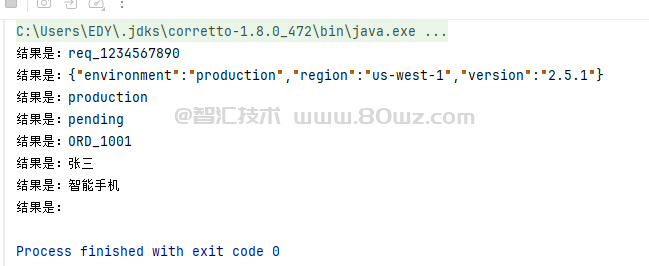
可以看到不同的测试组案例都能获取到对应的值信息,是不是非常方便?大家可以多试试。



还没有评论,来说两句吧...