

在上一篇文章我们介绍了Elasticsearch的文档部分,在文档里面,我们可以看到每一份文档里面有很多字段,那么这些字段是有类型的。这里的类型我们可以理解成mysql这样的类型,例如:
CREATE TABLE `costs` (
  `cost_id` int(11) NULL COMMENT "消费记录id",
  `store_id` int(11) NULL COMMENT "店铺id",
  `product_id` int(11) NULL COMMENT "产品id",
  `user_id` int(11) NULL COMMENT "用户id",
  `buy_nos` int(11) NULL COMMENT "购买数量",
  `costs_total` decimal(10, 2) NULL COMMENT "消费总金额",
  `cost_cts` datetime NULL COMMENT "消费时间"
)
在这里面我们创建一张表,这个表里面有很多字段,每个字段都分配有类型,例如 cost_id的类型是int,costs_total的类型是decimal。
同样的在elasticsearch中,每一个index里面的字段也有类型区分,示例如下:
{
	"mappings": {
		"properties": {
			"birthday": {
				"format": "[yyyy-MM-dd]",
				"index": false,
				"type": "date"
			},
			"roomNums": {
				"index": false,
				"type": "integer"
			},
			"personnelName": {
				"type": "keyword"
			},
			"gender": {
				"index": false,
				"type": "integer"
			},
			"orgPath": {
				"index": false,
				"type": "keyword"
			},
			"isExisted": {
				"index": false,
				"type": "keyword"
			},
			"bulidingsNums": {
				"index": false,
				"type": "integer"
			},
			"companyName": {
				"index": false,
				"type": "text"
			},
			"latitude": {
				"index": false,
				"type": "float"
			},
			"typeName": {
				"index": false,
				"type": "keyword"
			},
			"unitAndOrgId": {
				"index": false,
				"type": "long"
			},
			"roomPath": {
				"index": false,
				"type": "keyword"
			},
			"unitNum": {
				"index": false,
				"type": "keyword"
			},
			"adress": {
				"index": false,
				"type": "keyword"
			},
			"delFlag": {
				"index": false,
				"type": "integer"
			},
			"local": {
				"index": false,
				"type": "keyword"
			},
			"createdAt": {
				"format": "[yyyy-MM-dd HH:mm:ss]",
				"index": false,
				"type": "date"
			},
			"creditCode": {
				"index": false,
				"type": "keyword"
			},
			"vehicleNumber": {
				"type": "keyword"
			},
			"communityName": {
				"analyzer": "ik_smart",
				"type": "text"
			},
			"id": {
				"index": false,
				"type": "keyword"
			},
			"communityId": {
				"index": false,
				"type": "long"
			},
			"brand": {
				"index": false,
				"type": "keyword"
			},
			"longitude": {
				"index": false,
				"type": "float"
			},
			"updatedAt": {
				"format": "[yyyy-MM-dd HH:mm:ss]",
				"index": false,
				"type": "date"
			},
			"dataType": {
				"index": false,
				"type": "integer"
			},
			"avatar": {
				"index": false,
				"type": "keyword"
			},
			"certificateNumber": {
				"type": "keyword"
			},
			"phone": {
				"type": "keyword"
			},
			"drivingLicense": {
				"index": false,
				"type": "keyword"
			},
			"registration": {
				"index": false,
				"type": "keyword"
			},
			"visitor": {
				"index": false,
				"type": "keyword"
			},
			"houseNum": {
				"index": false,
				"type": "keyword"
			},
			"remarks": {
				"index": false,
				"type": "keyword"
			},
			"status": {
				"index": false,
				"type": "keyword"
			}
		}
	}
}
例如上面的json示例就是在Elasticsearch中创建的mapping信息(类似于在mysql里面创建表)。可以看到每一个字段都会有一个type字段,type里面的值就是我们为Elasticsearch创建的类型。例如:我们这个birthday字段,我们定义的类型是date,所以在索引存储数据的时候只能给这个字段存储date类型的值,而不能存储其他值,例如存储123.12这种float类型的值就会直接报错。
在Elasticsearch中支持哪些数据类型呢?下面列举下
| 分类 | 类型 | 说明 |
| 字符串 | text | string类型,会分词 |
| keyword | string类型,不会分词 | |
| 整数类型 | long | 长整型 |
| integer | 整形 | |
| short | 短整型 | |
| byte | ||
| 浮点类型 | double | 64位双精度浮点类型 |
| float | 32位单精度浮点类型 | |
| half_float | 16位半精度浮点类型 | |
| scaled_float | 缩放类型的浮点类型 | |
| 逻辑类型 | boolean | 布尔类型 |
| 日期类型 | date | 支持字符串格式的日期类型,例如: “2018-01-13” 或 “2018-01-13 12:10:30” 支持long类型的毫秒数,即13位的长整型日期 支持integer类型的描述,即10位的整形日期 |
| 范围类型 | range | 范围类型要求字段值描述的是一个数值、日期或IP地址的范围, 在添加文档时可以使用: gte、gt、lt、lte分别表示 >=、 > 、< 、<= 。 |
| 二进制类型 | binary | 二进制字段是指用base64来表示索引中存储的二进制数据,可用来存储二进制形式的数据,例如图像。默认情况下,该类型的字段只存储不索引。 |
| 复合类型 | array | 数组类型 |
| object | json格式的对象数据 | |
| nested | 嵌套类型 | |
| geo_point | 地理坐标类型 | |
| geo_shape | 地理地图 | |
| ip | ip类型 | |
| completion | 范围类型 | |
| token_count | 令牌计数类型 | |
| attachment | 附件类型 | |
| percolator | 抽取类型 |
总结下:
1、elastcsearch的类型主要是字段规定的类型
2、在每一个index里面,所有的字段都会有类型
3、在elastcsearch中,一个字段可以有多个类型,例如下面的示例:
put user


{
	"settings": {
		"index": {
			"number_of_shards": "1",
			"number_of_replicas": "0"
		}
	},
	"mappings": {
		"properties": {
			"id": {
				"type": "long"
			},
			"name": {
				"type": "keyword"
			},
			"age": {
				"type": "integer"
			},
			"description": {
				"type": "text",
				"analyzer": "ik_max_word",
				"fields": {
					"keyword": {
						"ignore_above": 256,
						"type": "keyword"
					}
				}
			},
			"cts": {
				"type": "date"
			}
		}

	}
}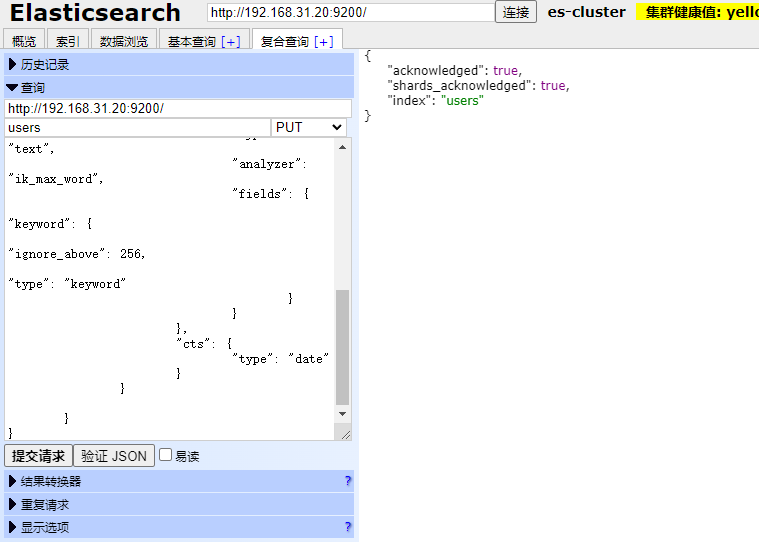
在这里我们可以看到description这个字段我们使用两个类型,分别是keyword和text。
备注:
1、这里的ignore_above指的是字符串长度超过这个length的时候就不会索引出来。



还没有评论,来说两句吧...