

在实际工作中,我们会涉及到对请求的request和response内容进行打印的需求,这样子方便排查问题,所以本文给一个springboot web项目相关的日志打印示例,具体代码如下:
package org.web.module.filter;

import java.util.Enumeration;

import javax.servlet.http.HttpServletRequest;

import org.aspectj.lang.JoinPoint;
import org.aspectj.lang.ProceedingJoinPoint;
import org.aspectj.lang.annotation.After;
import org.aspectj.lang.annotation.Around;
import org.aspectj.lang.annotation.Aspect;
import org.aspectj.lang.annotation.Before;
import org.aspectj.lang.annotation.Pointcut;
import org.aspectj.lang.reflect.MethodSignature;
import org.springframework.stereotype.Component;
import org.springframework.web.context.request.RequestContextHolder;
import org.springframework.web.context.request.ServletRequestAttributes;

import com.alibaba.fastjson.JSON;

import lombok.extern.slf4j.Slf4j;

@Aspect
@Component
@Slf4j
public class WebLogAspect {

    /** 以 controller 包下定义的所有请求为切入点 */
    @Pointcut("execution(public * org.web.module..controller.*.*(..))")
    public void webLog() {}
    /**
     * 在切点之前织入
     * @param joinPoint
     * @throws Throwable
     */
    @Before("webLog()")
    public void doBefore(JoinPoint joinPoint) throws Throwable {
        // 开始打印请求日志
        ServletRequestAttributes attributes = (ServletRequestAttributes) RequestContextHolder.getRequestAttributes();
        HttpServletRequest request = attributes.getRequest();
        // 打印请求相关参数
        log.info("========================================== Start ==========================================");
        // 打印请求 url
        log.info("URL            : {}", request.getRequestURL().toString());
        // 打印 Http method
        log.info("HTTP Method    : {}", request.getMethod());
        // 打印调用 controller 的全路径以及执行方法
        log.info("Class Method   : {}.{}", joinPoint.getSignature().getDeclaringTypeName(), joinPoint.getSignature().getName());
        // 打印请求的 IP
        log.info("IP             : {}", getIpAddr(request));
        // 打印请求入参
        printRequestParamsLog(joinPoint);
        // 打印header信息
        printHeaderInfoLog(request);
    }
    /**
     * 在切点之后织入
     * @throws Throwable
     */
    @After("webLog()")
    public void doAfter() throws Throwable {
        log.info("=========================================== End ===========================================");
        // 每个请求之间空一行
        log.info("");
    }

    /**
     * 环绕
     * @param proceedingJoinPoint
     * @return
     * @throws Throwable
     */
    @Around("webLog()")
    public Object doAround(ProceedingJoinPoint proceedingJoinPoint) throws Throwable {
        long startTime = System.currentTimeMillis();
        Object result = proceedingJoinPoint.proceed();
        // 打印出参
        //log.info("Response Result: {}", new Gson().toJson(result));
        log.info("Response Result: {}", JSON.toJSONString(result));
        // 执行耗时
        log.info("Use Time       : {} ms", System.currentTimeMillis() - startTime);
        return result;
    }


    /**
     * 打印request请求参数
     */
    public void printRequestParamsLog(JoinPoint joinPoint){
        String[] parameterNames = ((MethodSignature) joinPoint.getSignature()).getParameterNames();
        Object[] parameterValues = joinPoint.getArgs(); // 获取方法参数
        StringBuffer paramsBuf = new StringBuffer();
        for (int i = 0; i < parameterValues.length; i++) {
            log.info("Request params : {}", parameterNames[i]+" = "+parameterValues[i]);
        }
    }

    /**
     * 打印header信息
     */
    public void printHeaderInfoLog(HttpServletRequest request){
        Enumeration<String> headerNames = request.getHeaderNames();
        while (headerNames.hasMoreElements()) {
            String key = (String) headerNames.nextElement();
            String value = request.getHeader(key);
            log.info("Header         : {}", key+" = "+value);
        }
    }

    /**
     * @Description: 获取ip
     */
    public String getIpAddr(HttpServletRequest request) {
        String ipAddress = null;
        ipAddress = request.getHeader("x-forwarded-for");
        if (ipAddress == null || ipAddress.length() == 0 || "unknown".equalsIgnoreCase(ipAddress)) {
            ipAddress = request.getHeader("Proxy-Client-IP");
        }
        if (ipAddress == null || ipAddress.length() == 0 || "unknown".equalsIgnoreCase(ipAddress)) {
            ipAddress = request.getHeader("WL-Proxy-Client-IP");
        }
        if (ipAddress == null || ipAddress.length() == 0 || "unknown".equalsIgnoreCase(ipAddress)) {
            ipAddress = request.getRemoteAddr();
        }
        // 对于通过多个代理的情况,第一个IP为客户端真实IP,多个IP按照','分割
        if (ipAddress != null && ipAddress.length() > 15) { // "***.***.***.***".length()
            // = 15
            if (ipAddress.indexOf(",") > 0) {
                ipAddress = ipAddress.substring(0, ipAddress.indexOf(","));
            }
        }
        // 或者这样也行,对于通过多个代理的情况,第一个IP为客户端真实IP,多个IP按照','分割
        return ipAddress;
    }

}
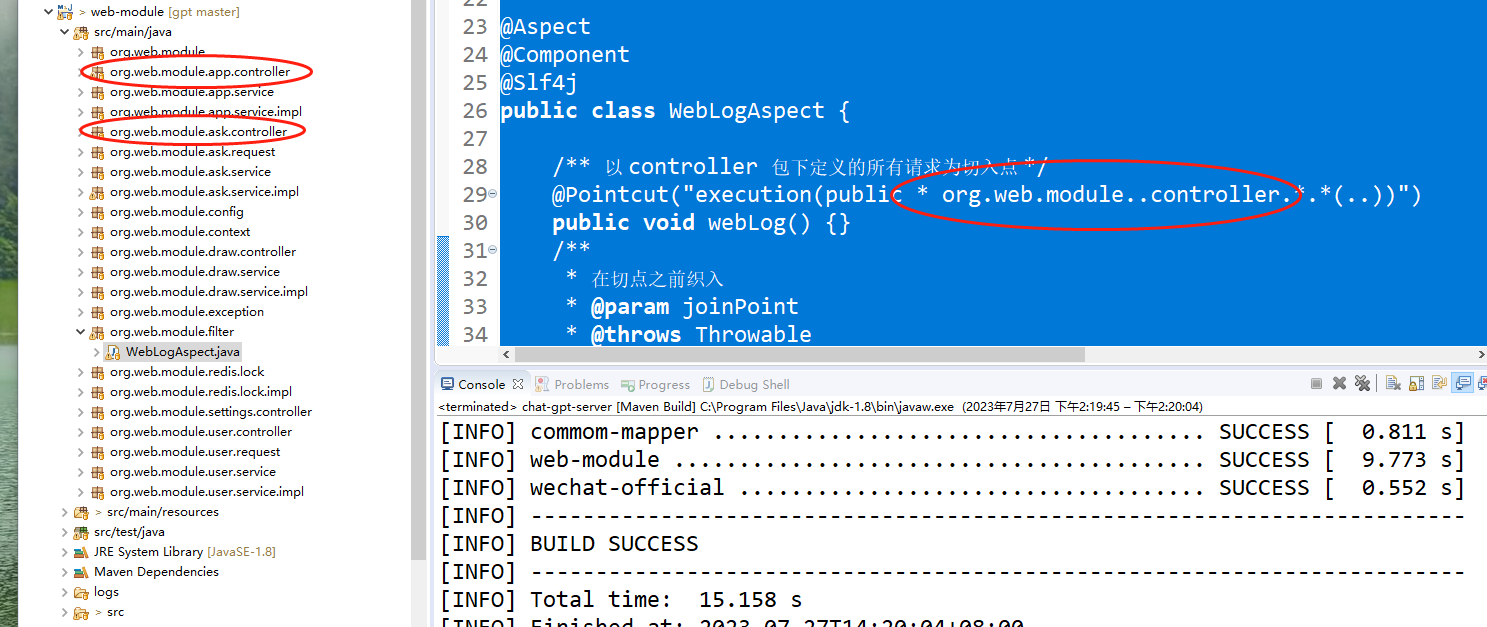
把这个类复制到项目里面去,然后把这里的切面的类修改为自己的类即可,如下图:
最后请求的时候就可以看到具体的日志输出了,如下图:
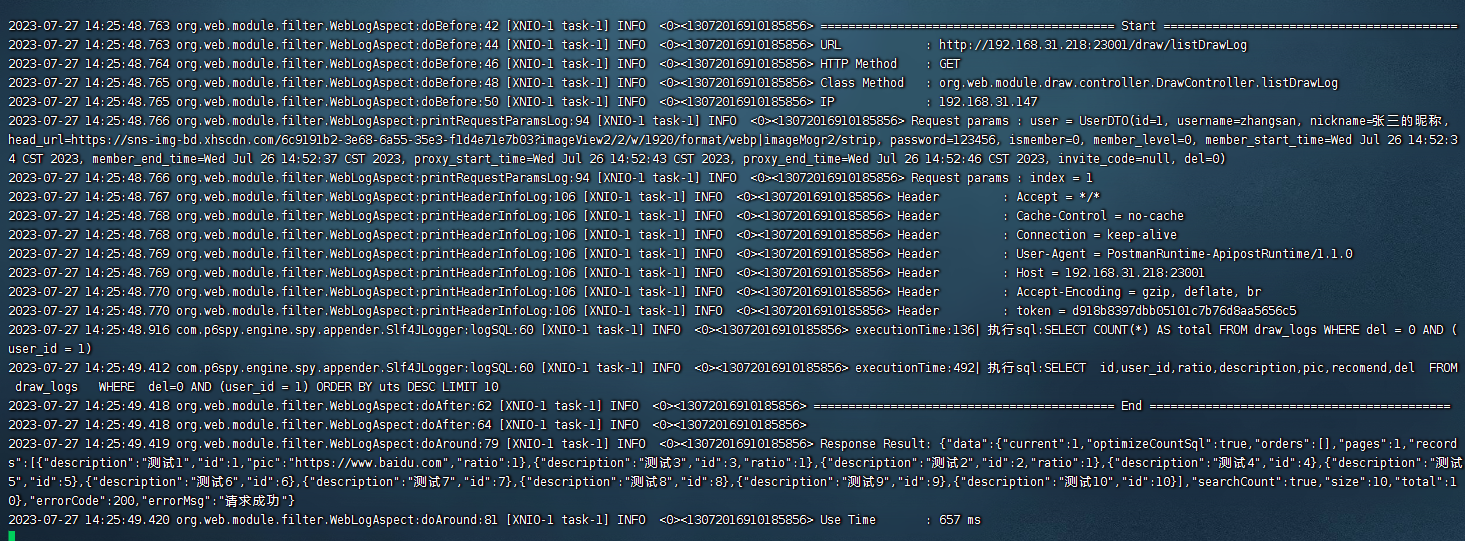
在这里他打印是分两部分分别输出的,一部分是request,一部分是response。所以这里我们建议使用全链路日志的方式打印,这样子可以打印出对应的链路id,就可以直接查询到对应的request请求了,全链路日志可参考:《微服务实战spring cloud alibaba(十五)全局链路日志追踪》



还没有评论,来说两句吧...