

在使用rabbitmq作为消息队列的时候,我们需要了解下rabbitmq的消息模式。rabbitmq的消息模式有5种,分别是:simple模式,Fanout模式,Direct模式,Topic模式,work模式,。本文主要介绍的是Direct模式。
这个Direct的模式是在Fanout模式下添加了routingkey作为过滤条件,满足过滤条件的消息才会被发送到对应的消息队列里面去,不满足过滤条件,则不会被发送到对应的消息队列中去。
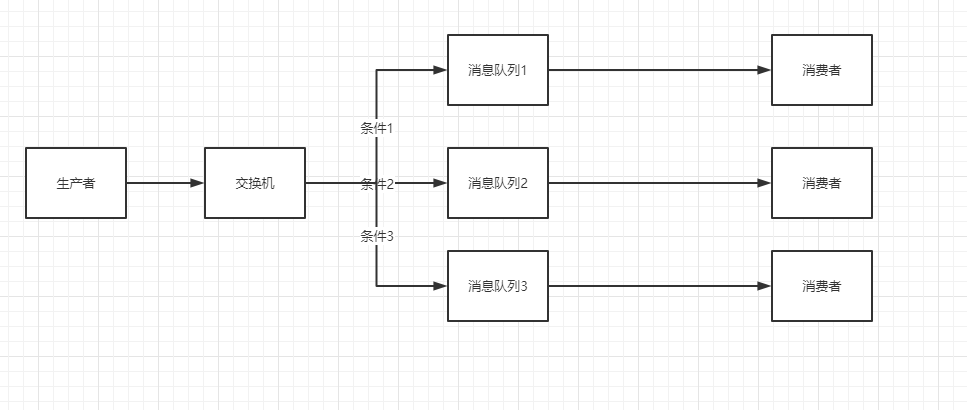
如上图,这里每一个消息队列都有一个前置条件,分别是条件1,条件2,条件3,这个条件代表的就是routing key。当发送的消息满足条件1的时候,这条消息只会被发送到消息队列1,而消息队列2或者消息队列3是不会受到消息的。这样就相当于在广播的范围内,每个消息队列根据条件过滤筛选出来消息,然后处理对应的逻辑即可。下面使用代码演示一下。
一、添加maven依赖
                <dependency>
			<groupId>com.rabbitmq</groupId>
			<artifactId>amqp-client</artifactId>
			<version>5.9.0</version>
		</dependency>
二、编写生产者
package com.rabbitmq.producer;

import java.io.IOException;
import java.nio.charset.StandardCharsets;
import java.util.concurrent.TimeoutException;

import org.junit.After;
import org.junit.Before;
import org.junit.Test;

import com.rabbitmq.client.BuiltinExchangeType;
import com.rabbitmq.client.Channel;
import com.rabbitmq.client.Connection;
import com.rabbitmq.client.ConnectionFactory;
import com.rabbitmq.client.MessageProperties;

import lombok.extern.slf4j.Slf4j;

@Slf4j
public class DirectProducer {

	private Connection connection = null;
	private Channel channel = null;
	private ConnectionFactory factory = null;

	// 发布订阅模式需要一个交换机
	private String exchangeName = "direct-exchange";
	// 发布订阅模式需要多个队列绑定到交换机上
	private String quename1 = "test1";
	private String quename2 = "test2";
	private String quename3 = "test3";

	/**
	 * 初始化rabbitmq连接
	 *
	 * @throws TimeoutException
	 * @throws IOException
	 */
	@Before
	public void init() throws IOException, TimeoutException {
		// 1、初始化连接参数
		factory = new ConnectionFactory();
		factory.setHost("192.168.31.20");
		// 设置rabbitmq的登录账号和密码
		factory.setUsername("guest");
		factory.setPassword("guest");
		factory.setPort(5673); // 默认端口是5672,这里服务器端口冲突,因此改到5673
		factory.setVirtualHost("/");
		// 2、创建连接、通道
		connection = factory.newConnection();
		channel = connection.createChannel();

		// 绑定交换机,并且类型选择使用DIRECT
		channel.exchangeDeclare(exchangeName, BuiltinExchangeType.DIRECT);

		// 为交换机绑定队列
		channel.queueDeclare(quename1, true, false, false, null);
		channel.queueDeclare(quename2, true, false, false, null);
		channel.queueDeclare(quename3, true, false, false, null);

		//为队列绑定channel,在这里的第三个参数就是routingkey
		channel.queueBind(quename1, exchangeName, "yellow");
		channel.queueBind(quename2, exchangeName, "blue");
		channel.queueBind(quename3, exchangeName, "red");


	}

	@After
	public void destroy() {
		// 关闭通道
		if (channel != null && channel.isOpen()) {
			try {
				channel.close();
			} catch (Exception e) {
				log.error(e.getMessage(), e);
			}
		}
		// 关闭连接
		if (connection != null && connection.isOpen()) {
			try {
				connection.close();
			} catch (Exception e) {
				log.error(e.getMessage(), e);
			}
		}
	}

	@Test
	public void sendMsg() throws Exception {

		// 发送消息内容
		String message = "take a message red";

		// 发送消息我们就指定的是交换机,同时需要标注本消息的routingkey
		channel.basicPublish(exchangeName, "red", MessageProperties.PERSISTENT_TEXT_PLAIN,
				message.getBytes(StandardCharsets.UTF_8));
		log.info("发送消息完成,消息内容是:{}", message);
	}

}
三、编写消费者
package com.rabbitmq.producer;

import java.io.IOException;
import java.util.concurrent.TimeoutException;

import com.rabbitmq.client.CancelCallback;
import com.rabbitmq.client.Channel;
import com.rabbitmq.client.Connection;
import com.rabbitmq.client.ConnectionFactory;
import com.rabbitmq.client.DeliverCallback;
import com.rabbitmq.client.Delivery;

import lombok.extern.slf4j.Slf4j;

@Slf4j
public class DirectConsumer {

	private static final String queueName = "test3";


	public static void main(String[] args) throws IOException, TimeoutException {

		// 1、创建连接工程
		ConnectionFactory factory = new ConnectionFactory();
		factory.setHost("192.168.31.20");
		factory.setUsername("guest");
		factory.setPassword("guest");
		factory.setPort(5673);
		factory.setVirtualHost("/");

		// 2、获取 Connection和 Channel
		Connection connection = factory.newConnection();
		Channel channel = connection.createChannel();

		channel.basicConsume(queueName, true, new DeliverCallback() {
            @Override
            public void handle(String consumerTag, Delivery delivery) throws IOException {
                log.info("消息队列:{} 接收到消息:{}",queueName,new String(delivery.getBody(), "UTF-8"));
            }
        }, new CancelCallback() {
            @Override
            public void handle(String consumerTag) throws IOException {
            }
        });
		log.info("消费者启动成功,准备开始消费数据");
	}
}
上面的案例可以看到我们在发送的时候,选择了routing key为red,那么我们在消费者里面,运行后可以看到只有queueName为test3的消费者才会收到消息,queueName为其他队列名称的时候是无法收到消息的。
以上就是Rabbimmq的Direct消息模式。
备注:
1、需要切换消息模式为Direct
2、在绑定chanal的时候,需要为每一个队列指定一个routing key。



还没有评论,来说两句吧...