

在上一篇文章《Mapreduce实战案例(二)实现map端join》我们实现了在map端进行join,这篇文章的话,我们演示下实现在reduce端做join。
在reduce端进行join的时候,我们主要实现的逻辑如下:
map端逻辑:
1、在map端读取所有的文件,然后把内容转换成实体
2、根据转换成的实体,找到对应的join键。
3、把join键的值做成output的key,把实体转换成join的值发送给reduce
reduce端的逻辑:
1、会接受到相同join键对应的key组成的values集合
2、遍历values集合,获取里面的值
3、在最外面证明一个通用的model
4、把遍历到的值转换成通用的model
5、写出结果(通用的module)
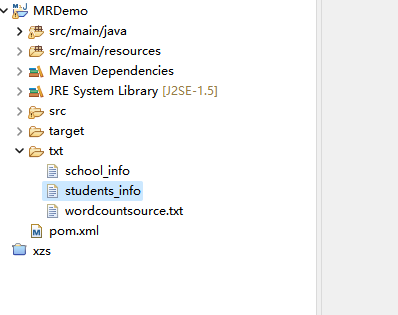
按照上面的逻辑我们来挨个实现一下。这里我们还是使用上一篇文章的示例数据:school_info和students_info,如下图:
首先我们创建一个ReduceJoinMapper的类,用来读取文件转换实体,示例代码如下:
package com.mr.demo.map;

import java.io.IOException;

import org.apache.hadoop.io.Text;
import org.apache.hadoop.mapreduce.Mapper;
import org.apache.hadoop.mapreduce.lib.input.FileSplit;

import com.alibaba.fastjson.JSON;
import com.mr.demo.model.SchoolPoJo;
import com.mr.demo.model.StudentPoJo;

/**
 * 这里是主要是对接在reduce端进行join,因此mapper端主要做的内容就是把文本读取出来,然后做成对应的model,然后把他放进去
 * @author Administrator
 *
 */
public class ReduceJoinMapper extends Mapper<Object, Text, Text, Text>{

	@Override
	protected void cleanup(Mapper<Object, Text, Text, Text>.Context context) throws IOException, InterruptedException {
		super.cleanup(context);
	}

	@Override
	protected void map(Object key, Text value, Mapper<Object, Text, Text, Text>.Context context)
			throws IOException, InterruptedException {

		//首先我们回去拿到的文件名,根据文件名进行对应的文件实体解析
		FileSplit fileSplit = (FileSplit) context.getInputSplit();
		String fileName = fileSplit.getPath().getName();
		if(fileName.contains("school")) {
			//如果文件名包含school字样,则按照school的实体进行解析
			String line =  value.toString();
			SchoolPoJo poJo = JSON.parseObject(line, SchoolPoJo.class);
			//这里我们要根据school_id进行join,因此这里我们把school_id做成键发出去
			context.write(new Text(poJo.getSchool_id()+""),new Text( JSON.toJSONString(poJo)));
		}else {
			//则按照学生的实体进行解析
			String line =  value.toString();
			StudentPoJo poJo = JSON.parseObject(line, StudentPoJo.class);
			//这里我们要根据school_id进行join,因此这里我们把school_id做成键发出去
			context.write(new Text(poJo.getSchool_id()+""),new Text( JSON.toJSONString(poJo)));
		}
	}

	@Override
	public void run(Mapper<Object, Text, Text, Text>.Context context) throws IOException, InterruptedException {
		super.run(context);
	}

	@Override
	protected void setup(Mapper<Object, Text, Text, Text>.Context context) throws IOException, InterruptedException {
		super.setup(context);
	}


}
然后我们创建一个ReduceJoinReducer的类,主要做遍历聚合使用,示例代码如下:
package com.mr.demo.reduce;

import java.io.IOException;

import org.apache.commons.lang3.StringUtils;
import org.apache.hadoop.io.Text;
import org.apache.hadoop.mapreduce.Reducer;

import com.alibaba.fastjson.JSON;
import com.mr.demo.model.StudentPoJo;

public class ReduceJoinReducer extends Reducer<Text, Text, Text, Text> {

	@Override
	protected void cleanup(Reducer<Text, Text, Text, Text>.Context context)
			throws IOException, InterruptedException {
		super.cleanup(context);
	}

	@Override
	protected void reduce(Text key, Iterable<Text> values, Reducer<Text, Text, Text, Text>.Context context)
			throws IOException, InterruptedException {
		//上一个,我们把schoolid做成了key发送过来,因此这里的相同key的value会是一个集合被保存过来,因此这里我们直接遍历values做join操作即可。
		StudentPoJo pojo = new StudentPoJo();
		for(Text value : values) {
			String line = value.toString();
			StudentPoJo p = JSON.parseObject(line, StudentPoJo.class);
			if(StringUtils.isBlank(p.getSchool_name())) {
				//解析到了学生
				pojo.setStudent_id(p.getStudent_id());
				pojo.setStudent_name(p.getStudent_name());
				pojo.setSchool_id(p.getSchool_id());
			}else {
				//解析到了学校
				pojo.setSchool_name(p.getSchool_name());
				pojo.setSchool_address(p.getSchool_address());
			}
		}
		//上面我们通过遍历的方式把实现了数据的join,最后我们把结果写入到文件中去。
		context.write(new Text(JSON.toJSONString(pojo)), new Text());
	}

	@Override
	public void run(Reducer<Text, Text, Text, Text>.Context arg0) throws IOException, InterruptedException {
		super.run(arg0);
	}

	@Override
	protected void setup(Reducer<Text, Text, Text, Text>.Context context)
			throws IOException, InterruptedException {
		super.setup(context);
	}

}
最后我们整合下job信息,直接设置即可,示例代码如下:
package com.mr.demo;

import java.io.IOException;

import org.apache.hadoop.conf.Configuration;
import org.apache.hadoop.fs.FileSystem;
import org.apache.hadoop.fs.Path;
import org.apache.hadoop.io.Text;
import org.apache.hadoop.mapreduce.Job;
import org.apache.hadoop.mapreduce.lib.input.FileInputFormat;
import org.apache.hadoop.mapreduce.lib.output.FileOutputFormat;

import com.mr.demo.map.ReduceJoinMapper;
import com.mr.demo.reduce.ReduceJoinReducer;

/**
 * 这里我们测试下reduce join
 * @author Administrator
 *
 */
public class ReduceJoinJobs {

	public static void main(String[] args) throws Exception {

		// 在运行mapreduce的时候,我们一般都是直接执行hadoop
		// -jar的时候会把这个动态的参数传递进来,因此我们还是尽量保持一致,但是这里的话,我们主要是在本地运行测试,因此这里做下判断,在本地运行的时候稍微简化一点。
		if (null == args || args.length == 0) {
			args = new String[] {
					// 这里做join操作,因此我们传入一个文件夹即可,然后在代码里面根据文件名来区别实体解析
					"/school",
					// 这里的输出需要指定一个文件夹
					"/schooltarget"
			};
		}
		// 首先都要创建下这里的configuration,这里我们由于是演示的项目,因此没有特别需要配置configuration的地方,如果没有单独配置,那么所有的配置就直接拿取整个hadoop集群的配置。
		Configuration configuration = new Configuration();
		// 首先我们看看target目录是否存在,存在的话把他给手动删除一下
		deleteOutPut(args[1], configuration);

		// 然后我们在这里编写mapreduce,来计数
		Job job = Job.getInstance(configuration, "ReduceJoin task");
		//设置运行的类,一般都是本类
		job.setJarByClass(MapJoinJobs.class);
		//设置mapper类
		job.setMapperClass(ReduceJoinMapper.class);
		job.setReducerClass(ReduceJoinReducer.class);
		//指定输出的内容key
		job.setOutputKeyClass(Text.class);
		//指定输出的内容value
		job.setOutputValueClass(Text.class);
		//添加需要读取的数据源目录
		FileInputFormat.addInputPath(job, new Path(args[0]));
		//添加需要输出的数据目录
		FileOutputFormat.setOutputPath(job, new Path(args[1]));
		System.exit(job.waitForCompletion(true) ? 0 : 1);

	}


	/**
	 * 去服务器上删除掉输出目录,避免输出目录已经存在而报错
	 *
	 * @param args
	 * @throws IOException
	 */
	private static void deleteOutPut(String path, Configuration configuration) throws IOException {
		FileSystem fileSystem = FileSystem.get(configuration);
		if (fileSystem.exists(new Path(path))) {
			fileSystem.delete(new Path(path), true);
		}
	}
}
然后我们把项目打包下上传上去,运行下demo
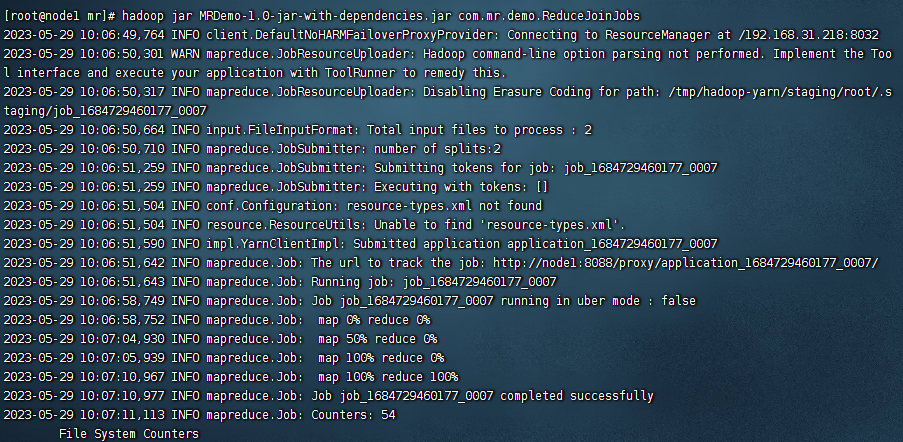
可以看到运行成功了,我们看看结果文件:
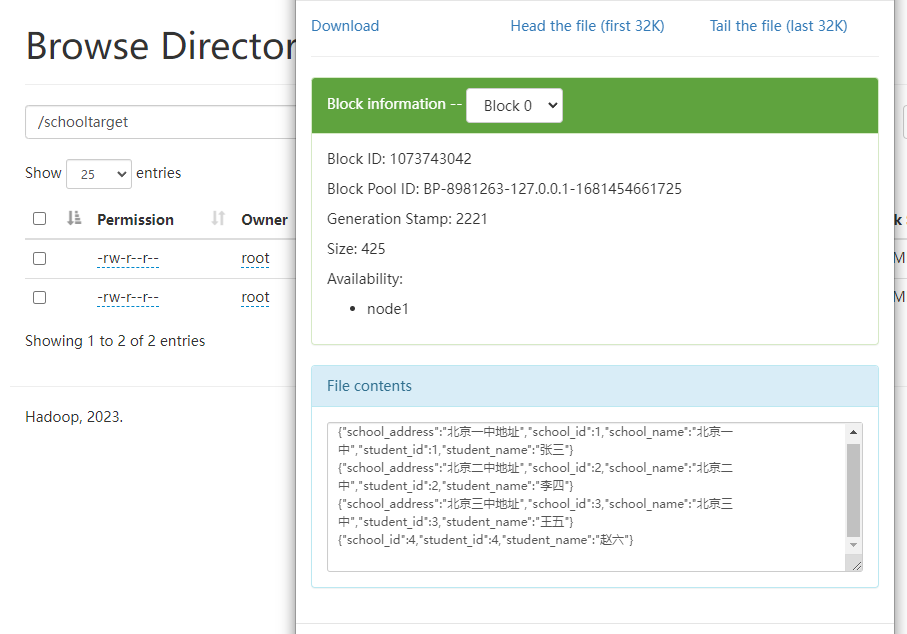
没有任何问题。以上就是我们在reduce端实现join的详细案例,最后按照惯例,附上本案例的源码,登录后即可下载:



还没有评论,来说两句吧...